
How HubSpot Scheduling Works
When patients try to book appointments with you, HubSpot checks the available time slots on your connected Google Calendar.
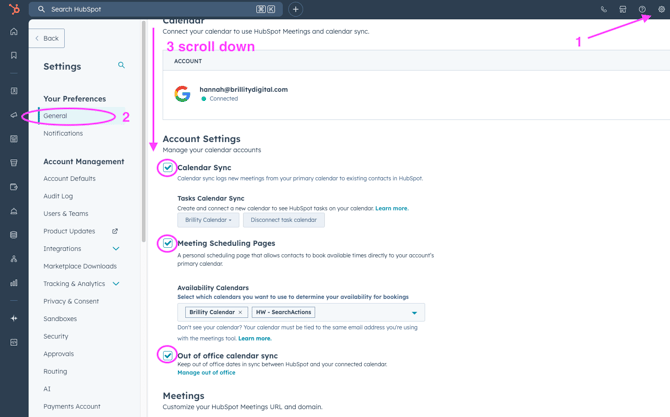
1. Verify Your Hubspot Settings
- Make sure the "Sync out of office with your calendar" toggle is ON
Blocking Out-of-Office Time for Holidays
Recommended: Use Google Calendar
Unfortunately, HubSpot doesn't have a built-in feature to block off specific future dates (like holidays). The best way to prevent appointment bookings during your time off is to block those days on your Google Calendar.
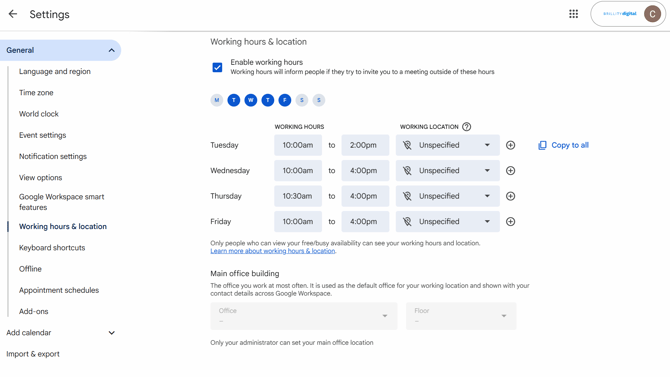
How to Block Holiday Time:
- Open your Google Calendar
- Create all-day events for each day you'll be off (e.g., "Out of Office - Holiday")
- Mark yourself as "Busy" for these events
- Save the events
Once you block off days on your Google Calendar, the HubSpot scheduling page will automatically reflect that and prevent patients from booking during those times.
Why This Works:
Since HubSpot checks your Google Calendar for availability (within your set office hours), any "Busy" events you create will block those time slots from being bookable.
Important Notes for Meeting Links:
If you use HubSpot scheduling pages (meeting links):
- Make sure the "Consider working hours" toggle is ON in your meeting link settings
- Verify your Google Calendar is connected to HubSpot
- Your meetings will automatically respect both your HubSpot office hours AND your Google Calendar availability
Need Help?
If you have trouble accessing these settings, connecting your Google Calendar, or have questions, send an email to crwebsupport@brillitydigital.com.